 HikariSub
What is sent
The anonymous usage data HikariSub sends, every event and property in it, what is never sent, and how to turn it off.
HikariSub sends anonymous usage data: which features are used, errors and crashes, and how fast things open. It shows what people use, what goes wrong and what is slow, so work can go where it helps. It never sends your files, their names or what is in them.
It is on by default, also in a copy updated from an earlier version and after importing legacy settings, which never had this option. This page lists every event and every property HikariSub can send, and how to turn it off.
This page is about the HikariSub app. This website uses Cloudflare Web Analytics instead, with no cookies.
Discord presence, which shows what you are doing in your Discord status, is separate from usage data and off by default.
Turning it off
Any of these turns it off:
- File › Settings › Updates and privacy › Privacy › Send anonymous usage data. The change applies on OK or Apply.
- Send anonymous usage data on the Updates and privacy step of the Getting started window. It is saved when you press Finish.
- The
DO_NOT_TRACKenvironment variable, set to anything but0, turns it off for each run that has it. On Linux, start HikariSub withDO_NOT_TRACK=1 hikarisub, or export it in your shell profile. On Windows, add a user environment variable namedDO_NOT_TRACKwith the value1. The switch in Settings still shows your setting.
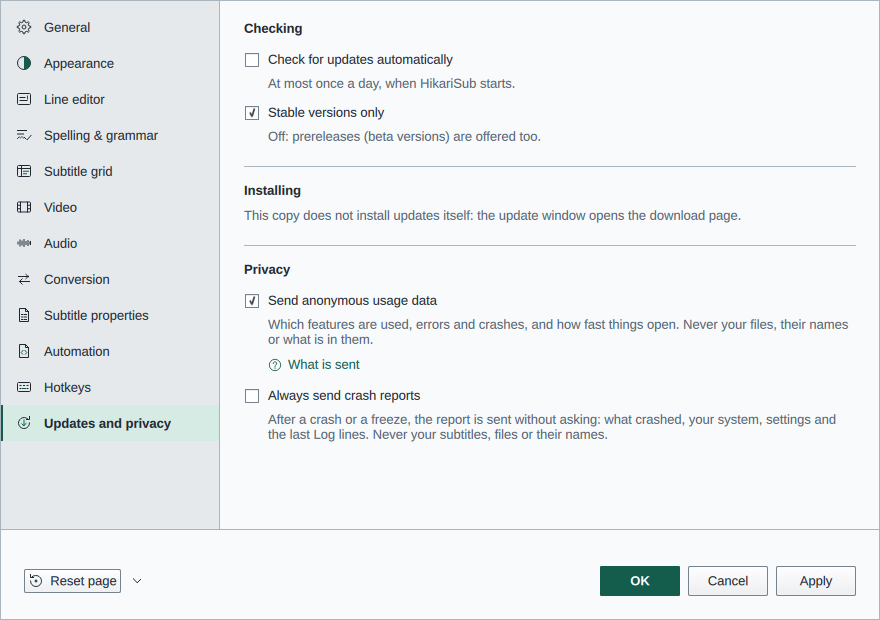
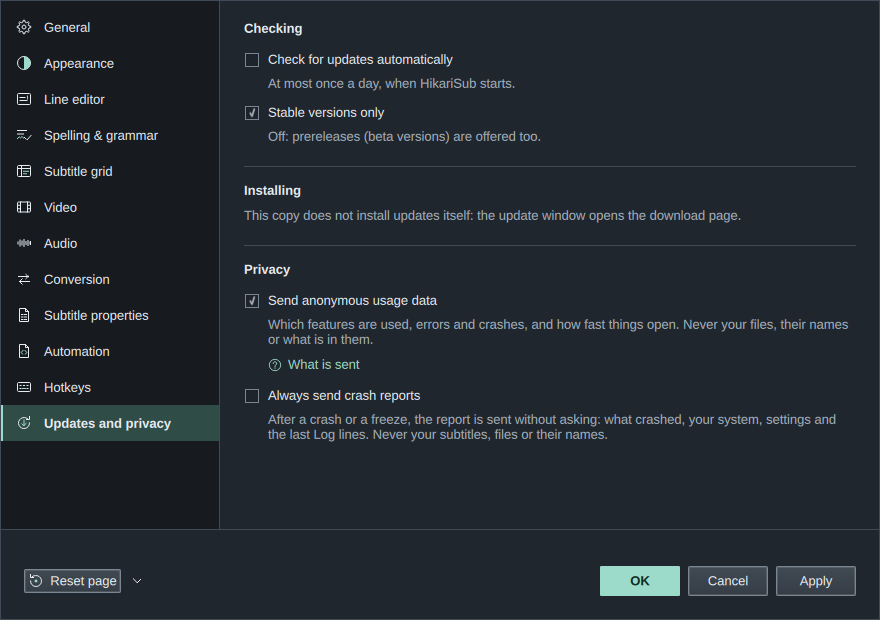
Both switches are the same setting, and both have a What is sent link that opens the full list in your browser.
Only release packages send. Every release package (setup, portable zip, AppImage, deb, rpm and tar.gz) carries the key that lets HikariSub send, so they all send while the switch is on. Builds from source don't carry it, and neither do forks' builds or test builds: they queue nothing and send nothing, though the switch still shows.
Reset page on the Updates and privacy page, and Reset all settings…, turn it back on, since on is the default.
What turning it off does
It takes effect at once:
- Nothing more is queued or sent. A send that is under way is stopped.
- The events waiting to be sent are deleted, from memory and from the cache folder.
- The anonymous ID is deleted.
Events that were already sent are not deleted. Crash and freeze reports are not affected: they go only when you send them, or when Always send crash reports is on.
The first send is 60 seconds after HikariSub starts. If you turn it off before then, for example on Getting started's Updates and privacy step at the first start, nothing has been sent.
With DO_NOT_TRACK set, the events waiting from earlier runs are deleted when HikariSub starts. The anonymous ID is kept.
If you turn it on again, HikariSub starts a new ID. The session length and the frame counts in app_closed then count from that moment.
Where it goes
Events go to PostHog Cloud EU, at https://eu.i.posthog.com.
- PostHog receives your IP address with each send, as any server does. The HikariSub project there discards it.
- Every event asks PostHog to make no location lookup from the IP address (
$geoip_disable) and no person profile ($process_person_profile). - Each send also carries HikariSub's project key, which is the same in every copy, and the user agent
HikariSub/followed by the version.
The anonymous ID
Events go under a random ID (a UUID), made the first time HikariSub queues an event. It is not made from anything about you or your computer, and is not tied to anything else.
It is kept in state.json in your user folder, as usageDataId under privacy.
To get a new one, turn Send anonymous usage data off, press Apply, then turn it on again. Reset all settings… also clears it.
Each run of HikariSub also has a session ID, a new random UUID for every start. It is not kept in your settings.
When it is sent
- Events wait in memory and in
analytics-queue.jsonin the cache folder:%LOCALAPPDATA%\HikariSub\cacheon Windows,~/.cache/hikarisubon Linux. Portable copies use it too. - The queue holds at most 1000 events, or 1 MB of them. Past that, the oldest are dropped.
- HikariSub sends up to 100 events at a time: 60 seconds after it starts, then every 5 minutes.
- At quit, after the window has closed, it sends once more and waits at most 2 seconds for it.
- HikariSub never waits for a send, and a failed send shows no message. Without a connection, the events wait for the next send, also in a later run.
- If PostHog refuses a batch outright, those events are dropped and not tried again.
- When HikariSub reads the queue at the next start, it checks each event against the lists below again and drops any that doesn't match.
What is never sent
- File names and paths, of subtitles, video, audio, scripts or anything else
- Subtitle text, script text, or anything else you typed
- Style names and font names
- The names of scripts, other than the scripts that come with HikariSub
- The names of your saved layouts
- Which values you chose in Getting started
- An automation macro's hotkey
Every property is an ID from a fixed list, a bucket, a yes or no, a version or a count. Before an event is queued, HikariSub checks it against the lists below, and drops any event that doesn't match them.
Every event
On every event
| Property | Value |
|---|---|
distinct_id | The anonymous ID |
$process_person_profile | false: PostHog makes no person profile |
$geoip_disable | true: PostHog makes no location lookup |
$session_id | This run's random session ID |
$lib | hikarisub |
$lib_version | The app version, such as 0.1.0-beta.1 |
Each event also has its name and the time it happened, in UTC, to the second.
Start and quit
| Event | Sent | Properties |
|---|---|---|
app_started | When the main window first shows | See below |
app_closed | At quit | session_length and the frame counts, below |
app_started has:
| Property | Value |
|---|---|
version | The app version |
channel | stable or prerelease |
$os | windows, linux or other |
$os_version | The system's version as Qt reports it, such as 11 or 24.04; other if it is longer than 24 characters or has other characters than letters, digits, ., _ and - |
arch | x86_64, arm64 or other |
package | installer, portable, appimage, deb, rpm, aur (when the AUR packages are out) or build_tree |
qt_version | The Qt version, such as 6.11.2 |
language | The interface language: en, ko_KR, pl, ta or th_TH |
theme | light, dark, high_contrast_white or high_contrast_black |
theme_follows_system | true or false |
layout | The layout the window opened in: editing, timing, translation, typesetting, karaoke, saved (one of your saved layouts, not its name) or custom |
screens | 1, 2 or 3+ |
scale | The window's display scale: 1x, 1.25x, 1.5x, 2x or 3x+ |
startup_time | How long the window took to show, as a time bucket |
app_closed has:
| Property | Value |
|---|---|
session_length | <1m, 1-5m, 5-15m, 15-60m, 1-3h or 3h+, since the start or since you turned sending on |
render_frames_lt8ms, render_frames_8_16ms, render_frames_16_33ms, render_frames_33_66ms, render_frames_66_200ms, render_frames_200ms_plus | How many frames of subtitles took that long to draw in this run, while sending was on: under 8 ms, 8 to 16 ms, and so on, up to 200 ms or more |
The time buckets, used by startup_time and open_time, are <250ms, 250-500ms, 0.5-1s, 1-2s, 2-5s, 5-15s, 15-60s and 60s+.
Features used
| Event | Sent | Properties |
|---|---|---|
command_used | When a command runs | command, via |
panel_opened | When you show a panel, from the View menu, a panel's menu or a button such as Fix minor errors | panel |
dialog_opened | When a dialog or window opens | dialog |
layout_changed | When you choose a layout | layout |
getting_started_finished | When you press Finish in Getting started | pages_changed |
getting_started_skipped | When you close Getting started without finishing: Skip setup, Esc or closing the window | None |
star_prompt_shown | When the suggestion to star HikariSub on GitHub shows, at most twice ever | None |
star_prompt_clicked | When you press its Star on GitHub | None |
command: the command's ID in the hotkey list, such asGLOBAL_SAVE_SUBSorAUDIO_PLAY. Only the commands in that list are sent. Automation macros are never sent.via:keyfor a command a key ran, orpointerfor one from a menu, a toolbar or a panel's button.panel:video,audio,editor,grid,reference,timing,search,automation,original,log,styles,fix_minor_errors,templateorspellchecker.dialog:about,allTagsEdition,aspectRatio,autosaves,columns,conversion,crashReport,credits,dummyVideo,fontCatalogClashes,fontCatalogs,fontCollector,fontPicker,fontsFromSubtitles,gettingStarted,history,hotkeyCapture,kanjiTimer,karaokeCheck,listChooser,manageLayouts,movePanel,reportIssue,resample,saveLayout,scriptProperties,selectLines,setNewFps,settings,settingsImport,shapesEdition,spellAddedWords,styleClashes,styleManager,translationShift,unsavedChanges,updateAvailableorwhatsNew. A script's dialog isautomation_script, whichever script it is.layout:editing,timing,translation,typesetting,karaoke, orsavedfor one of your saved layouts. Its name is not sent.pages_changed: the Getting started pages whose settings Finish changed, fromlanguage,import,look,layout,media,editing,updatesandfiles. Which values you chose is not sent. If you turn sending off on the Updates and privacy step, this event is not sent either.
How often:
command_usedis sent once per command andviain each run.panel_openedanddialog_openedare sent once per panel or dialog in each run.layout_changedis sent each time, up to 20 times in each run.
Errors and crashes
| Event | Sent | Properties |
|---|---|---|
automation_error | When a macro fails, its script's process is lost or force-stopped, or a script doesn't load | kind, script |
$exception | At the start after HikariSub crashed or was closed while frozen, and when it comes back from a freeze | $exception_list, $debug_images, $exception_level, crashed_version, report_id, freeze_seconds |
kind:failed,lost,stoppedorload_failed.script: the file name of a script that comes with HikariSub, such askara-templater.lua, with spaces turned into_(skew_gradient.lua). It counts as one only while its contents match the copy HikariSub came with, in the program's folder or copied to your user folder. Any other script isuser script, and its name is not sent. A macro whose check declines to run on your selection is not an error and sends nothing.$exception_list: one entry with the crash's type, how it was caught, and where it happened:- the type: on Linux the signal,
SIGSEGV,SIGABRT,SIGBUS,SIGFPEorSIGILL; on Windows the exception's name, such asEXCEPTION_ACCESS_VIOLATION, or else its code,0x…;APP_HANGfor a freeze; - how it was caught:
signal,sehor, for a freeze,watchdog; not handled; - up to 32 stack frames, each a module and an offset. The module is a file name only, and only for HikariSub's own files and the system's (in
/usror/lib, or the Windows folder). Any other module isother. The offset is a hex number into that module. - from 0.1.0-beta.2, a frame in a named module also has
image_addr, the address the module was loaded at, andinstruction_addr, that address plus the offset. Anothermodule has neither.
- the type: on Linux the signal,
$debug_images(from 0.1.0-beta.2): for each named module, its file name (code_file, the same as the frame's module), where it was loaded (image_addr) and its debug id: the GNU build-id on Linux, or the GUID and age of its PDB on Windows. The debug id says which build the module is, so PostHog can show function names and lines from the symbols each release uploads. It names the build, not your computer.$exception_level:fatal, orerrorfor a freeze HikariSub came back from.crashed_version: the version that crashed or froze.report_id: a random UUID made for the report, the same as itscrash_report's.freeze_seconds: for a freeze, how many seconds the window didn't respond.
Opening video and audio
| Event | Sent | Properties |
|---|---|---|
video_opened | When opening a video ends | open_time, outcome, kind |
audio_opened | When opening audio ends: it is all loaded, or it failed | open_time, outcome, kind |
open_time: how long it took, as a time bucket.outcome:readyorfailed.kind:fileordummyfor video;file,from_videoordummyfor audio.
Audio that you close or replace before it finishes loading sends nothing.
Crash and freeze reports
When HikariSub crashes, or its window doesn't answer for 10 seconds, it writes a small record to the cache folder: the version, the type of crash or how long it froze, and the stack frames, as above. It does so whether usage data is on or off. The record is not a crash dump: it holds no memory, no file names and no text. At the next start, or when HikariSub comes back from a freeze, the record becomes a report and HikariSub asks you about it: see Crash and freeze reports.
A report goes once, only when you press Send report in its window, or by itself when you have turned on Always send crash reports. That is so even with usage data off.
- With usage data on, the record alone was already queued as
$exception, like any other event. Send report then sends onlycrash_report, which holds the rest: your note, the Log lines and the settings summary.report_idlinks the two. If you turned usage data off after the record was queued, the queue was deleted, so Send report sends the record again. - With usage data off, or
DO_NOT_TRACKset, Send report sends both$exceptionandcrash_report, under a random ID made for that one report and kept nowhere. No anonymous ID is made, and there is no session ID.
A report goes straight away to the same address, with the same project key and user agent, and is not queued. Only release packages can send one.
crash_report has:
| Property | Value |
|---|---|
report_id | The same random UUID as its $exception's |
kind | crash or freeze |
note | What you typed in the report window, up to 4,000 characters. Left out when you typed nothing |
log | The Log's last 200 lines, with file names, quoted text, font names and folders replaced |
settings | The settings summary: ids and plain values from a fixed list, never a folder, font or name |
version, channel, $os, $os_version, arch, package, qt_version | As in app_started |
What a report holds lists the settings in the summary and how the Log lines are changed. HikariSub still offers your last session after a crash; see After a crash.
Discord presence
HikariSub can show what you are doing in your Discord status. It is off by default. Turn it on in File › Settings › Updates and privacy › Privacy › Show what I am doing in Discord.
It talks only to the Discord app on the same computer, never to a HikariSub server. Discord shows the status to the people who can see yours. Without Discord running, nothing happens; HikariSub looks for Discord again every 20 seconds.
| Shown | Value |
|---|---|
| Activity | "Editing subtitles" |
| Mode | Editing, Timing, Translation, Typesetting or Karaoke: the workspace layout you chose last |
| Time | How long since presence was turned on in this run |
| Images | The HikariSub icon, and the mode's icon |
| Button | Get HikariSub, which opens hikarisub.org |
The texts are in HikariSub's interface language. Include the file name, under the switch and also off by default, adds the current tab's file name after the mode, such as Timing · episode01.ass. Only the name is sent, never its folder.
It never sends the video or audio name, folders or paths, subtitle text, line counts or progress.
Turning it off clears your status at once, and so does quitting HikariSub.
Star on GitHub suggestion
Once you have used HikariSub for a while, a quiet message may suggest starring it on GitHub: Enjoying HikariSub? "A star on GitHub helps others find it." Star on GitHub opens HikariSub on GitHub; Not now closes it. It never asks for anything else: no rating, sign-in or email.
It shows at most twice ever, and never again once you press Star on GitHub:
- only after HikariSub has been opened on at least 5 different days, with at least 3 hours in all while its window was active and a file was open, and at least 10 minutes into the current run;
- never on the first run, or on the first run after an update;
- never while video or audio plays, in full screen, while a dialog is open, or within 10 seconds of your last key press;
- at least 30 days after it last showed, however you closed it.
To stop it for good, turn off File › Settings › Updates and privacy › Privacy › Suggest starring HikariSub on GitHub. It is on by default.
The counts it needs stay in your settings file on this computer. Nothing about it is sent, except with usage data on: star_prompt_shown and star_prompt_clicked, with no properties.