 HikariSub
Furigana
Write the reading of each kanji into a karaoke line, let the Kanji timer suggest it from the romaji and a dictionary, and set it over the kanji with furi templates.
Furigana are small kana set over kanji to show how they are read. In a karaoke file, a syllable carries its reading after a bar: {\k40}君|きみ. The templater leaves the bar and the reading out of the syllable's text, and its furi templates set each reading over its kanji, in a smaller furigana style.
You can type the readings yourself, or let the Kanji timer write them. It suggests each reading from the romaji that sings it, and from a Japanese dictionary that comes with HikariSub.
In a karaoke line
The text before the bar is the syllable's base, and the text after it is its reading. A syllable without a bar has no furigana.
| Written | Means |
|---|---|
君|きみ | 君, read きみ |
#|み | A further highlight of the syllable before, with its own part of the reading |
声|!こえ | ! after the bar: the reading starts a group of its own |
声|<こえ | < after the bar: the same, and a long reading may spill over the left edge |
The full-width |, #, ! and < work the same.
{\k40}君|きみ{\k30}の{\k45}声|こえ{\k35}が{\k22}聞|き{\k18}こ{\k20}え{\k60}るSyllables with furigana that follow each other form one group. Their readings are set side by side, centred over their bases together. A syllable without furigana ends the group, and so does a ! or <. A reading wider than its bases spills to the right; after <, it stays centred and spills both ways.
Furigana templates
The templater reads the readings out of each karaoke line. In syl, line and char templates, a syllable's text is its base only.
A furi template runs once for each furigana part, and a code furi line too. There, syl is the furigana part, its text the reading, and basesyl the syllable it belongs to. Each part has the times of its syllable, or of its # highlight. Its position variables, such as $x and $y, place it just above the line. Its new lines get the line's furigana style: a run adds one for every style that has none, such as Default-furigana, at half the size.
These two templates show the line and its furigana:
template syl    {\pos($x,$y)}
template furi   {\pos($x,$y)}
The Template editor's New menu adds a furi template with Template for each furigana syllable, and a furi code line with Code for each furigana syllable.
In the Kanji timer
Turn on Furigana in the top row of the Kanji timer. It is off by default, and HikariSub remembers it. With it on, the timer writes each kanji group's reading after its kanji, as it writes the karaoke tags.
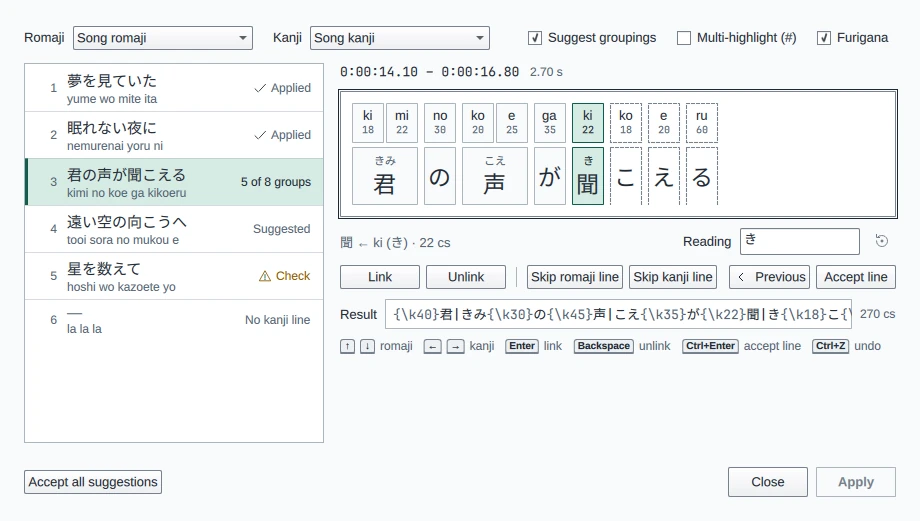
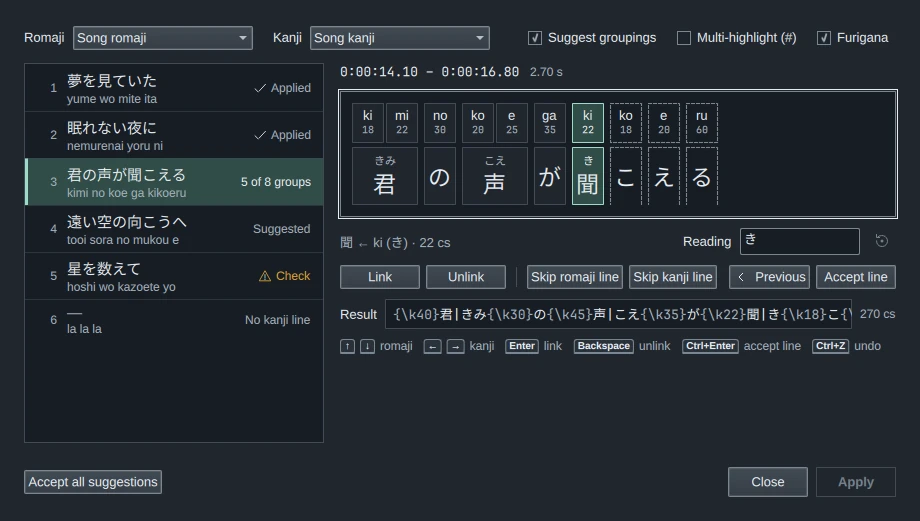
Each group's reading shows over its kanji. A suggested reading is grey; one you typed is in the text colour. Only kanji get a reading: a group's kana are left out of it, and a group of kana only has none. A reading comes from, in order:
- The reading you typed.
- The kana the romaji sings: the group's syllables read as kana, ki mi as きみ.
- The dictionary's reading, when the romaji isn't kana. 愛 sung love reads あい.
A small dot on a group marks a reading sung otherwise than the dictionary reads the word. Songs often do that: 永遠 sung towa reads とわ, where the dictionary has えいえん. The timer keeps the sung reading.
The Reading field
With Furigana on, the line under the groups has a Reading field for the current group, when it has kanji. Beside it, Dictionary: えいえん gives the dictionary's reading when the sung one differs, and Not sung in kana says that the reading comes from the dictionary.
- To change the reading, type it in the field. Press Enter, or leave the field, to set it; Enter also takes you back to the groups. Each reading set is one step that Ctrl+Z undoes.
- For no furigana on the group, empty the field.
- For a group with several runs of kanji, such as 心の声, type one reading per run with spaces between them:
こころ こえ. Any kind of space separates the readings, including a full-width space, a no-break space and a tab, and extra spaces are ignored. With another number of readings, the whole reading goes on the first run. - Use the suggestion, the button beside the field, drops what you typed for the current group and goes back to the suggestion. It is greyed out while the group has no typed reading.
A reading you typed is never replaced by a suggestion. It stays when you regroup, turn Suggest groupings off and on, or press Accept all suggestions.
The Reading field, Use the suggestion and Accept all suggestions have no keys.
What it writes
The Result line shows the kanji line with its readings, and Apply writes it:
Romaji  {\k18}ki{\k22}mi {\k30}no {\k20}ko{\k25}e {\k35}ga {\k22}ki{\k18}ko{\k20}e{\k60}ru
Kanji   君の声が聞こえる
Result {\k40}君|きみ{\k30}の{\k45}声|こえ{\k35}が{\k22}聞|き{\k18}こ{\k20}え{\k60}る- A group of kanji and kana is written as one group per stretch when its syllables line up with them, so only the kanji carry a reading:
{\k22}聞|き{\k18}こ. Otherwise the whole group carries the reading, its kana too:{\k40}聞こ|きこ. - With Multi-highlight (#) on, each syllable of a group takes its own kana when the reading is the sung one:
{\k18}君|き{\k22}#|み. Otherwise the whole reading goes on the first syllable, and the#syllables have none. - The timer writes no
!or<.
A kanji line with karaoke tags and furigana opens with them as typed readings. With Furigana off, the timer writes only typed readings, so turning it off doesn't take readings out of a line. To take one out, turn Furigana on and empty its Reading field.
The reading dictionary
The dictionary suggestions come from MeCab, a Japanese word analyser, with the UniDic 2.1.2 dictionary. Both come with HikariSub in every package; there is nothing to install. The dictionary is the Dictionary/unidic-lite folder beside the program, about 250 MB. It isn't copied into your user folder, and no setting points to another one.
HikariSub opens the dictionary the first time Furigana is on in the Kanji timer. It reads a word as it is written in kana, not as it is pronounced: 永遠 is えいえん, not えーえん.
If the dictionary can't be opened, the Kanji timer says No reading dictionary: readings come from the romaji only. Readings still come from the romaji, but a group whose romaji isn't kana gets none, and no dot marks a poetic reading. HikariSub tries to open it only once each time it starts: to get it back, reinstall HikariSub and start it again.
Settings
Furigana has no rows in File › Settings. The Kanji timer's Furigana option is the only one, and HikariSub remembers it with Suggest groupings and Multi-highlight (#).
What goes wrong
- No readings over the kanji. The file needs a
furitemplate.sylandlinetemplates write the bases only. - The bar and reading show in the generated lines. A
keeptagstemplate writes each syllable's text as it is, its|and reading included. - A reading takes in the next syllable. In the Audio panel's Karaoke mode, the bar and the reading are letters like the others. Joining
君|きみandのgives君|きみの, read きみの, and splitting inside a reading moves its end to the base of a new syllable. Time the syllables first, then add the readings in the Kanji timer. See Split and join. - A
|is grouped as kanji. In a kanji line without karaoke tags, the timer reads a|and its reading as plain characters. Leave the readings out of untimed kanji lines, and add them in the timer. - A
!or<is gone. The timer drops them from a line's own readings when it writes the line. Add them again after Apply. - A suggestion is wrong. Song readings are often not the dictionary's, and the romaji can be wrong too. Check each group, mainly the ones with a dot, and type the reading where it differs.