 HikariSub
Kanji timer
Copy the karaoke timing of romaji lines onto their kanji lines, one group of syllables at a time, for the whole song at once.
When a song has a romaji line timed with \k tags and a kanji line for the same words, the Kanji timer copies the timing across. You tell it which romaji syllables each kanji sings; it adds their times and writes one karaoke tag per group into the kanji line.
The romaji and the kanji lines need a style each, such as Song romaji and Song kanji. The timer works through every pair of the song in one window, and nothing reaches the subtitles until you press Apply.
Opening the window
Open it with Subtitles › Kanji timer…, which has no key of its own; you can give it one in File › Settings › Hotkeys.
The first time, HikariSub guesses the styles. The Romaji style is the one with the most \k lines. The Kanji style is the first other style whose name contains kanji or jp, else the next style that has lines. Change either if the guess is wrong. Changing a style starts the grouping over, and drops pairs you have done but not applied.
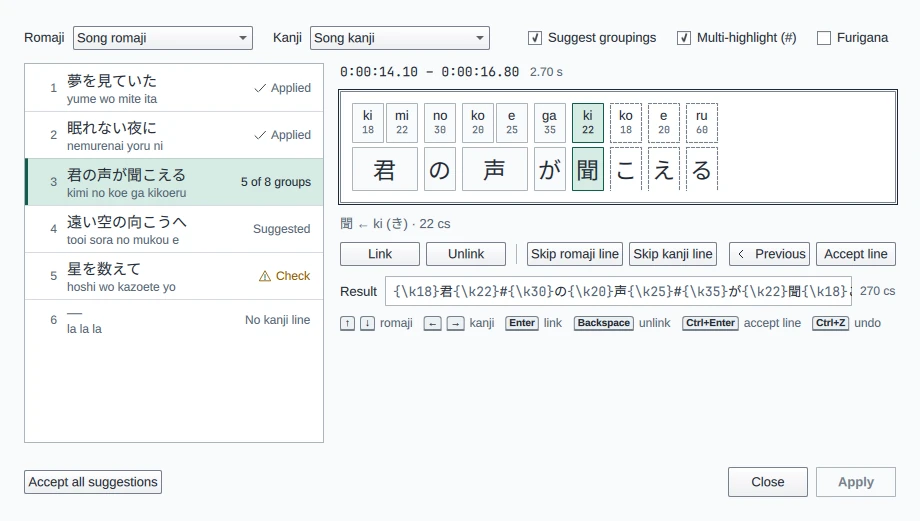
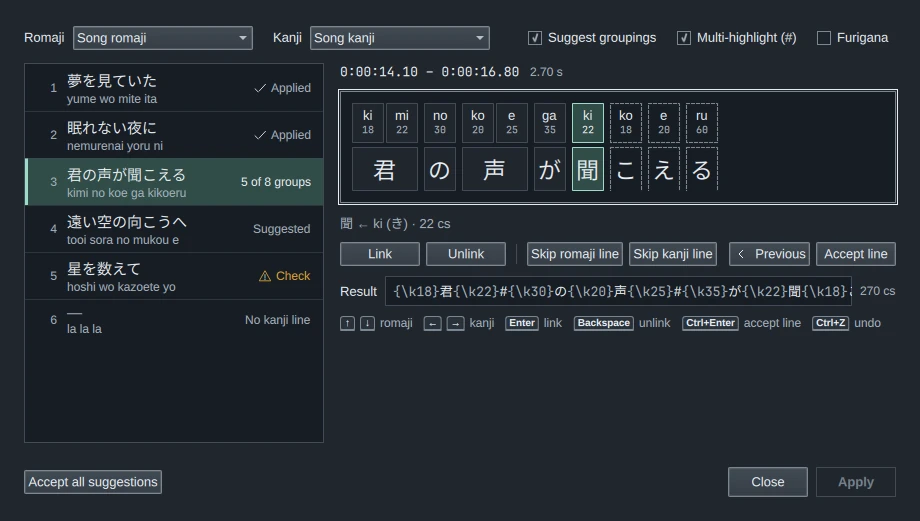
The window has three parts:
- The top row: the two styles, Suggest groupings, Multi-highlight (#) and Furigana.
- The pair list on the left: every romaji line with the kanji line it pairs with, and where each pair stands.
- The current pair on the right: the romaji line's times, the syllables over the kanji, and the Result, the kanji line as it would be written, with its total time.
How lines pair
Lines pair by time: each romaji line goes with the kanji line it overlaps most. A line that overlaps nothing is listed alone. If the kanji lines are not timed yet, so that nothing overlaps, the lines pair in the order they come in the file.
Lines with no text are left out, and so are templater fx lines.
| Status | Meaning |
|---|---|
| Suggested | A clean suggestion is ready to accept |
| Check | The suggestion has a problem to look at: a group with no kanji, or kanji left over |
| To do | Suggest groupings is off, and the pair is not done |
| Done | Accepted in the window, not written yet |
| Applied | Written to the subtitles |
| Changed | Its lines were edited after the pair was done; group it again |
| No kanji line, No romaji line | The line has no partner |
The pair you are working on shows which group you are on instead, such as 5 of 8 groups. Click a pair to open it. Only pairs that have both lines can be opened.
Grouping a line
A group is one or more romaji syllables and the kanji they sing. With Suggest groupings on, as it is by default, HikariSub proposes groups for the whole line. The current group is highlighted and the rest of the suggestion is drawn dashed. With it off, each group starts as one syllable and one character.
Adjust the current group, then link it, and the next group becomes current:
| Key | Does |
|---|---|
| ↑ ↓ | The group takes one more syllable, or gives one back |
| → ← | The group takes one more kanji, or gives one back |
| Enter | Links the group. Once every syllable is linked, accepts the line |
| Backspace | Unlinks the last linked group |
| Ctrl+Enter | Accepts the line with the rest of the suggestion |
| Ctrl+Z | Undoes the last change in the window |
You can also click: a click on a leftover syllable or kanji ends the current group there, and a click on a linked group reopens it, unlinking it and the groups after it. Link, Unlink and Accept line do the same as their keys.
The line under the strip names the current group, with the reading of the romaji in hiragana, such as 聞 ← ki (き) · 22 cs.
When a syllable has no kanji left, you can link it on its own as a blank group. Its time is written just before the next group's tag. Accept line takes the rest of the suggestion only when it has no blank group; link a blank group yourself. Kanji left after the last group join that group.
Skip romaji line and Skip kanji line take that line out of the pair, for a line that has no counterpart in the other style. The line you keep then pairs again without it. Previous goes back to the previous pair, as you left it.
Spaces
A space is never a character or a syllable to time. This covers every kind of space: a plain space, a full-width space, a no-break space, a tab, \h, and the line breaks \N and \n.
- In the kanji line, a space separates the kanji on either side of it, but no group takes it as a kanji. → steps over it to the next kanji.
- In the romaji line, a syllable that is only a space goes into a suggested group: the group before it, or the first group when the line starts with one. Its time goes into that group's tag. With Suggest groupings off, add it to a group yourself.
- The written line keeps its spaces where they were, even at the start or end of the line, or two in a row.
Romaji  {\k20}ki{\k20}mi{\k30}no
Kanji   君 の
Result  {\k40}君 {\k30}の
Accepting and applying
Accepting a line marks its pair Done and moves to the next pair that is not done. Accept all suggestions marks Done every pair whose status is Suggested, so check the pairs marked Check by hand.
Apply writes every Done pair's kanji line into the subtitles, as one step named Kanji timing that Edit › Undo takes back. The window stays open. Only the kanji lines' text changes; their times stay as they are.
If you close the window with pairs done but not applied, HikariSub asks whether to apply them: Apply, Discard or Cancel. Closing the subtitles asks too, even when they are otherwise saved: Save applies the kanji timing, then saves.
The window keeps working while you edit: if one of a done pair's lines changes, the pair shows Changed. With several tabs open, each file keeps its own pairs and groupings.
What it writes
Each group gets one karaoke tag before its first kanji. The tag's time is the sum of the group's syllables, and its letters are those of the group's first syllable, so \kf stays \kf. The kanji line's old karaoke tags are removed; its other tags stay.
Romaji  {\k18}ki{\k22}mi {\k30}no {\k20}ko{\k25}e {\k35}ga {\k22}ki{\k18}ko{\k20}e{\k60}ru
Kanji   君の声が聞こえる
Result  {\k40}君{\k30}の{\k45}声{\k35}が{\k22}聞{\k18}こ{\k20}え{\k60}る
Multi-highlight (#)
A folded group lights up once, however many syllables it has. Templates that use the templater's multi modifier can highlight each sung syllable instead, if the line marks the further syllables with #. Turn on Multi-highlight (#) to write them that way.
With it on, a group of several syllables keeps the first syllable's time on its kanji. Each further syllable is written after the kanji as a # syllable, {\k7}#, with its own time and its own letters. The line's total time is the same.
Romaji      {\k20}ge{\kf10}ki{\k30}no
Kanji       撃の
Off         {\k30}撃{\k30}の
On          {\k20}撃{\kf10}#{\k30}の
A group of one syllable and a blank group are written as before. Kanji left over at the end stay before the # syllables: {\k20}撃!{\k10}#.
The option is off by default, and HikariSub remembers it. It applies when the lines are written, so you can turn it on or off just before Apply; the Result line follows.
A kanji line that already has # syllables reads back as its groups: the # signs do not show in the pair list, and when its tags cover every romaji syllable, the pair opens with those groups already linked. A full-width # counts too.
Joining a # syllable
In the Audio panel's karaoke mode, the # syllables show as #. A middle-click, or Shift+click, on the boundary between two syllables joins them. A joined syllable stays a # syllable only when both halves were #. Otherwise the # is dropped, and the joined syllable keeps the other half's text and both times:
| Join | Gives |
|---|---|
撃 + # | 撃 |
# + 腐 | 腐 |
# + # | # |
A # among other text, such as #b, is not a # syllable and is joined as text.
Furigana
With Furigana on, the timer also writes each group's reading after its kanji, such as {\k40}君|きみ. It suggests the readings from the romaji and a dictionary, and you can change each one in the Reading field. See Furigana.
Undo
In the window, each change to the groups is one step: growing or shrinking a group, linking, unlinking, accepting and skipping, and setting a reading or using the suggestion. Ctrl+Z undoes it and takes you back to its pair. Opening another pair is not a step. Apply clears the window's history, because the changes are then in the subtitles' own history.
Tap to time
Time a karaoke line's syllables by tapping Space in time with the song, line after line, with slowed playback and a latency calibration.
Furigana
Write the reading of each kanji into a karaoke line, let the Kanji timer suggest it from the romaji and a dictionary, and set it over the kanji with furi templates.