 HikariSub
Onset snap
Let karaoke syllable boundaries you drag, and the syllables you tap, land on the places where the singer starts a syllable.
With Snap to vocal onsets on, a syllable boundary you drag in the Audio panel lands on the nearest vocal onset, a place where a sung syllable starts, if one is near. Each press in Tap to time does the same.
It is off by default, because finding onsets is unreliable on smooth singing, where one syllable glides into the next without getting louder. Try it on a song, and turn it off where it gets in the way.
Turning it on
In the Audio panel's Karaoke mode, open the menu of the Tap button's arrow, Tap options, and choose Snap to vocal onsets. When the panel is narrow, the menu is in ⋯ › Tap options.
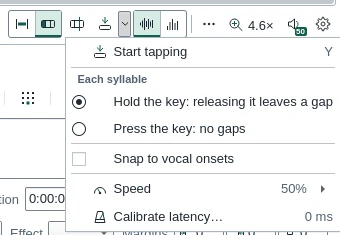
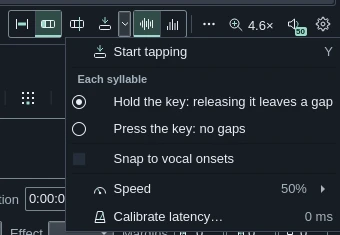
The option has no key and isn't in the Settings window; HikariSub remembers it. It only acts in Karaoke mode.
Turning it on moves nothing: boundaries already placed stay where they are.
Finding the onsets
HikariSub looks for onsets once the audio is loaded, while the option is on in Karaoke mode. It works in the background, so you can go on editing, but nothing snaps until it has finished. Meanwhile the status bar says Finding vocal onsets…, and then Vocal onsets found for five seconds. It shows no percentage, and the onsets aren't drawn on the waveform.
The onsets are kept for each audio file until you quit, so opening the same file again doesn't look again. Closing or replacing the audio, turning the option off or leaving Karaoke mode stops a search that hasn't finished.
An onset is a sudden rise in loudness in the range of the voice, 150 to 4000 Hz. HikariSub measures every 10 ms, and onsets fall on that 10 ms grid:
- A held note with vibrato starts once; a wobble within a semitone doesn't count as a new start.
- Two rises closer than 50 ms are one onset.
- Each onset is moved to the sharpest rise in loudness from 50 ms before it to 30 ms after. Where the voice glides in, with no sharp rise, it stays where it was found.
- Nothing quieter than about −48 dBFS starts a syllable, and bass below the voice starts none.
Only the first six hours of audio are searched.
Dragging a boundary
A boundary you drag snaps to the nearest onset within 100 ms of the pointer, and within 16 pixels at the current zoom, whichever is less. When you zoom in, 16 pixels can be less than 100 ms, so the reach shrinks. Of two onsets at the same distance, the earlier wins.
While you drag, the boundary jumps onto an onset and leaves it again as the pointer moves away. For example, with onsets at 3.87, 4.53 and 5.00 s, dragging to 3.90 or 3.96 s gives 3.87 s, while dragging to 4.08 s leaves the boundary at 4.08 s.
- The onset must lie between the boundary's neighbours. If the nearest one doesn't, the next nearest is used, or the boundary stays at the pointer.
- The last boundary snaps too, and moves the line's end with it.
- With the right button, the later syllables move by the snapped amount, and they don't snap themselves.
The line's start and end handles don't snap to onsets; they keep the usual snapping to keyframes and other lines.
Tapping
In Tap to time, each press snaps to the nearest onset within 100 ms, at or after the last boundary. A press is the start of a syllable in Hold mode, or the boundary between two in Press mode. Releases don't snap, so in Hold mode a syllable ends, and a gap starts, exactly where you let go.
What doesn't snap
- A click on a boundary, and the move made by Move the syllable line after a click: they land where you click.
- Releases in Tap to time.
- Auto split, Split syllable at the cursor and joins.
- Boundaries that were already placed when you turned the option on.
Undo
Snapping adds no step of its own. A snapped drag is undone with the drag, and snapped taps with the line's Tap timing step. Turning the option on or off changes nothing in the subtitles.
Furigana
Write the reading of each kanji into a karaoke line, let the Kanji timer suggest it from the romaji and a dictionary, and set it over the kanji with furi templates.
Karaoke check
List the karaoke lines whose syllables don't add up, run outside the line, have no length, or read differently in the audio editor, and go to each one.